When an AI Agent Edits a Spreadsheet, What Happens to the Workbook?
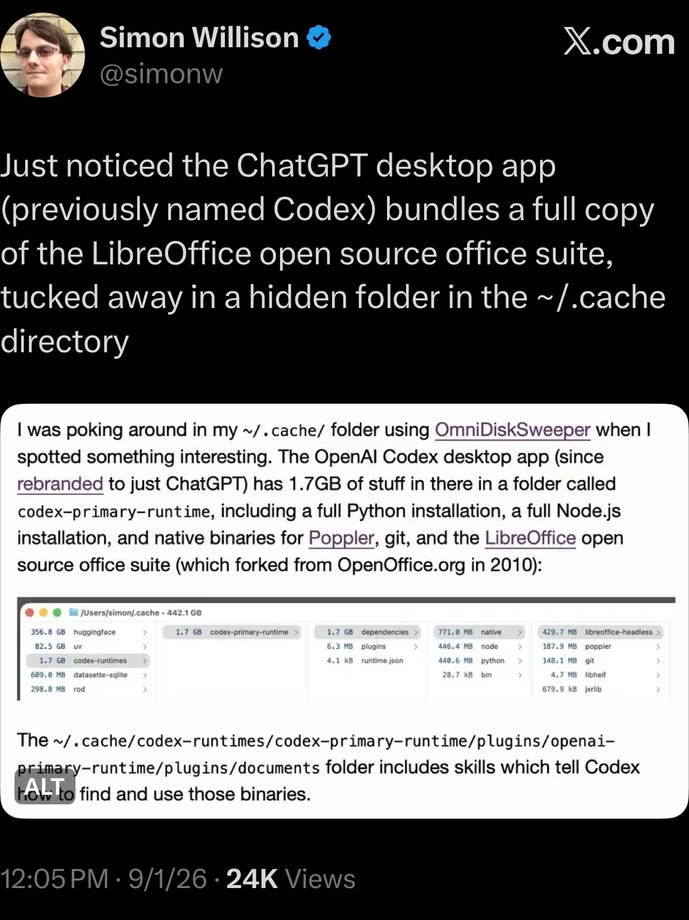
Simon Willison noticed something odd about the ChatGPT desktop app: tucked inside a hidden runtime cache (~/.cache/codex-runtimes) sits a full copy of LibreOffice.
I started tracing how agent harnesses handle spreadsheets. The investigation led from Python libraries to recalculation scripts and sandbox workarounds, then to a simpler question about the file itself.
When an agent opens a workbook, saves it, and changes nothing, what actually happens inside the file?
I ran a simple test across five workbooks. On a save with no requested edits, the bundled LibreOffice rewrote 8 to 151 internal package parts. WolfXL changed zero.
TL;DR: measured results
8–151
unrelated OOXML parts rewritten by the bundled LibreOffice on a no-op save, across five fixtures
0
unrelated parts changed by WolfXL on the same five no-op round trips
Every number below is backed by a public, SHA-256-pinned receipt. See the receipts
Silent package drift
An .xlsx or .xlsm file is not a flat document. It is an Open Packaging Conventions (OPC) ZIP archive containing dozens of interdependent XML parts: worksheets, shared string tables, styles, themes, drawing relationships, chart definitions, and calculation chains.
A no-op save should be invisible. Nothing was edited, so no part should change.
The test: five workbooks, round-tripped through both engines. Open the file, save it, touch no cell, then diff every package part against the original.1
Three fixtures are Excel-authored files (external links, a pivot chart with slicers, and a PowerPivot model); two come from the openpyxl and excelize test corpora (an aggregation model and a validation/protection/custom-XML workbook).
Across the five no-op round trips, the bundled LibreOffice rewrote 8 to 151 unrelated OOXML parts. WolfXL changed zero:
| Workbook fixture | WolfXL drift | LibreOffice drift |
|---|---|---|
| Average by region and quarter | 0 | 8 parts |
| Validation, protection, and custom XML | 0 | 19 parts |
| External links | 0 | 14 parts |
| Pivot chart and slicers | 0 | 31 parts |
| PowerPivot model | 0 | 151 parts |
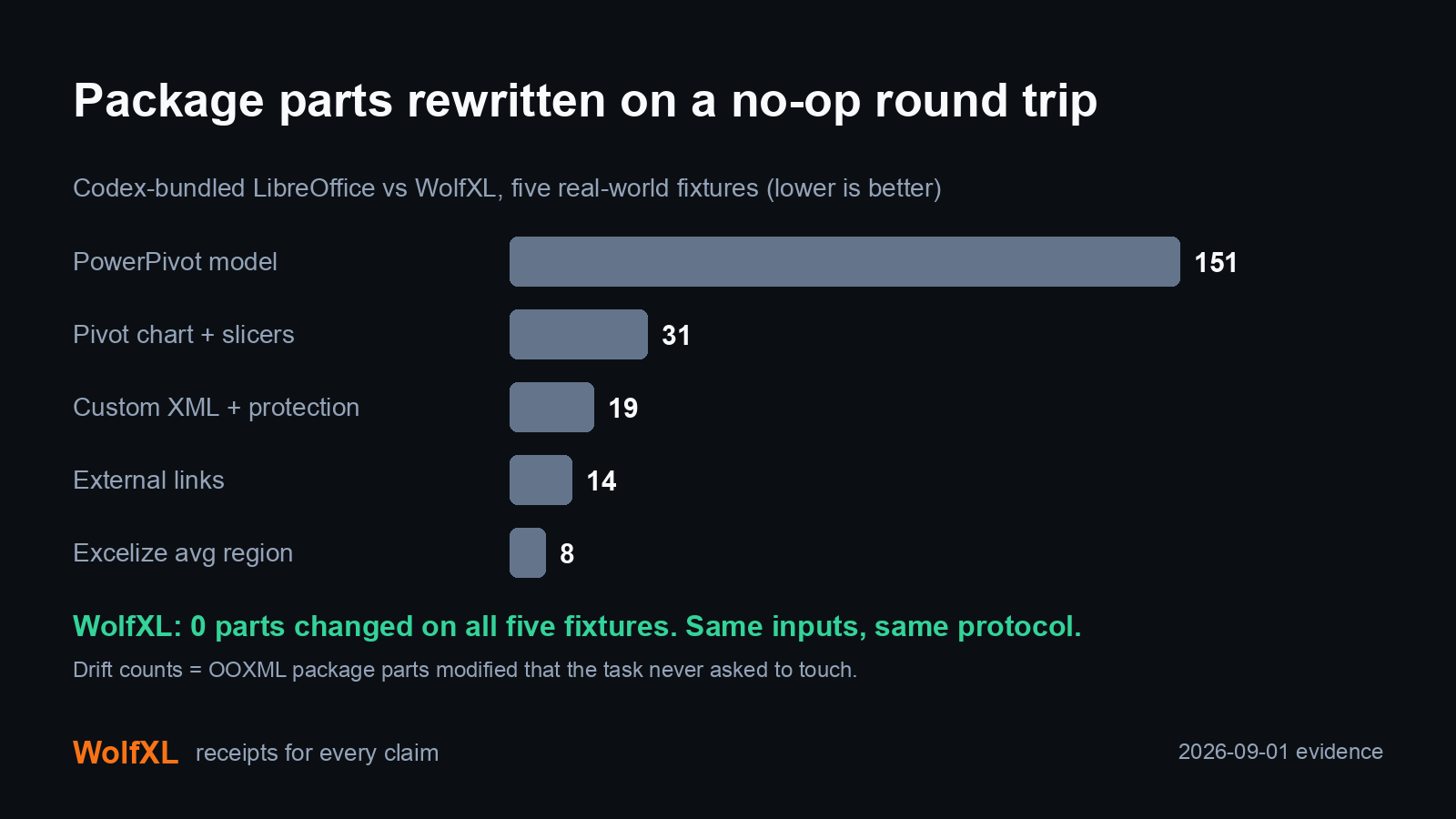
For an agent workflow, every rewritten part is another piece of state to verify. A targeted package diff isolates where the file changed; a broader rewrite leaves more work to establish that the surrounding workbook still behaves as intended.1
Why harnesses reach for LibreOffice
The route exists because each standard Python tool gives up something an agent workflow needs:
openpyxlhas no calculation engine, so formulas are stored but never evaluated, and the documentation warns that shapes in existing files are lost on a load/save cycle. VBA survives only when the caller passeskeep_vba=True.2pandasis built around tabular data. Reading a sheet into a DataFrame does not preserve the workbook's formulas, styles, or package structure for round-trip editing.xlsxwriteris write-only by design; it cannot inspect or edit existing files.
To get recalculation and export anyway, harnesses route spreadsheet work through a generalist engine. Three public examples:
| Harness | Spreadsheet route | Weight |
|---|---|---|
| OpenAI Codex | Bundles a full 423 MB headless LibreOffice build inside ChatGPT Desktop. | 423 MB |
| Anthropic Cowork | Runs openpyxl for edits, then a headless LibreOffice StarBasic macro (Standard.Module1.RecalculateAndSave) to recalculate. | Full LibreOffice |
| Nous Research / Xiaomi | Cloned the StarBasic script, ran persistent 400 MB daemons, or built custom XML unpack-and-repack scripts (explode.py/assemble.py). | ~400 MB |
The Cowork implementation goes further than most. When sandbox security blocks the UNIX domain sockets LibreOffice needs, it compiles a custom C socket shim (lo_socket_shim.so via gcc) on the fly and injects it with LD_PRELOAD. And Anthropic's own skills/xlsx/SKILL.md warns the model about a silent truncation trap:
"Never use XLOOKUP, SORT, FILTER, UNIQUE... they are spilling array functions and openpyxl has no spill metadata, so only the top-left cell gets a value; recalc.py reports total_errors: 0 on the truncated result."
A silent wrong answer that reports zero errors is the worst failure mode an agent workflow can have.
An in-process alternative
I built WolfXL, a Rust-backed spreadsheet engine for Python, around a strict preservation contract: in-process execution with surgical byte preservation.
The two architectures differ at the process boundary:
Harness subprocess route (today)
agent
→ spawn headless LibreOffice (423 MB)
→ full package re-serialization
→ workbook (8–151 parts rewritten)
In-process route (WolfXL)
agent
→ import wolfxl (in-process)
→ surgical part patch
→ workbook (0 unrelated parts)
For scripts on the common load/edit/save path, the API keeps familiar openpyxl semantics:
-from openpyxl import load_workbook, Workbook
+from wolfxl import load_workbook, Workbook
wb = load_workbook("model.xlsx", modify=True)
ws = wb["Inputs"]
ws["B7"] = 0.045
wb.save("model.updated.xlsx")
For agent pipelines, WolfXL provides a guarded transaction CLI:
wolfxl-ops inspect 'input.xlsx' --request-id 'agent-mutation-001' > 'inspect-receipt.json'
wolfxl-ops plan 'mutation-request.json' > 'plan-receipt.json'
wolfxl-ops apply 'mutation-request.json' > 'mutation-receipt.json'
The apply step writes an isolated temporary workbook, verifies the requested edit, asserts zero unrelated package drift, emits an attestation, and atomically publishes the destination file. If an unsupported operation or verification failure occurs, the process halts before the destination file is touched.
Speed and footprint
I measured WolfXL against the bundled Codex LibreOffice binary on macOS arm64. These selected cold-task medians use three recorded observations per row; the full receipt includes the other scenarios and the warm-path comparison.3
| Task | Input | WolfXL | LibreOffice | Speedup |
|---|---|---|---|---|
| No-op round trip, cold | 20,000x8 XLSX | 0.371 s | 1.446 s | 3.90x |
| CSV extraction, cold | 20,000x8 XLSX | 0.421 s | 1.503 s | 3.57x |
| Recalculate and extract, cold | 10x4 formula XLSX | 0.293 s | 0.721 s | 2.46x |
Installation and memory
| Runtime | Installed bytes |
|---|---|
| WolfXL benchmark environment | 37,524,645 |
| Bundled LibreOffice | 423,048,828 |
Workload peak process-tree RSS favored WolfXL (56-61 MiB vs. 104-124 MiB for LibreOffice). An isolated idle footprint probe favored LibreOffice (34.5 MiB vs. 53.1 MiB).
Intelligent routing, not replacement
Whatever engine produces an edit, verify two things: the intended change landed, and the protected state around it survived. Byte-preserved parts need no separate content diff. Rewritten parts need additional checks, including any dependent formulas or features affected by the edit.
For work outside a preservation engine's scope, LibreOffice remains the capable fallback for general document conversions, presentations, and legacy file formats.4 The sensible architecture is routing:
| Need | Preferred route |
|---|---|
| Supported cell, style, formula, or structural edit where preservation matters | Guarded WolfXL transaction |
| Broad office conversion or unsupported legacy format | LibreOffice fallback |
| Unsupported operation with no approved fallback | Fail visibly |
(OpenAI also maintains a private engine called Walnut for its own spreadsheet work; it was outside this comparison.)
Reproduce it yourself
Both producers are short scripts with pinned SHA-256 hashes (below). With a Python environment that has wolfxl installed and any LibreOffice binary on disk:
# Preservation drift on your own workbooks
python run_libreoffice_ooxml_preservation_compare.py model.xlsx --output-dir receipts/

# Paired runtime benchmark against your LibreOffice build
python benchmark_libreoffice_vs_wolfxl.py run \
  --soffice "$(command -v soffice)" \
  --output-dir receipts/ --run-id my-comparison
The producers emit the same JSON receipt format this post cites, so every number can be regenerated from source.
Evidence receipts
All benchmark runs, fixtures, and diff tools (5 pinned artifacts)
- Preservation receipt, SHA-256
781fc7730468a1cde78998c265a7e02940caf525a439651427033a7d734ece53 - Benchmark receipt, SHA-256
9874b2fbe1d5b1be08628975535ad43f3549b44728dc0239a62a3e9588cf7231 - Exact-source wheel build receipt, wheel SHA-256
9197ed89779e7992b45ae3b5bffef85f0abbe52da1a61ac96d5390550b960bf2 - Preservation producer snapshot, SHA-256
692e374d6e646c7af4966bee23a68ca29b0e4f93ee72c3eff92986611a00e6c7 - Benchmark producer snapshot, SHA-256
83f85eec2b6c5b8b695040f68ef04aa05f5417fc2ccdc18558a5f491a258ab95
The measured commit was clean before and after the wheel build, and the wheel was the one used for the published local benchmark.
Try WolfXL
pip install wolfxl
If an agent edit has to preserve charts, pivots, links, macros, or custom XML, run the workflow fit check. The source is public.
Footnotes
- Package drift reflects internal ZIP re-serialization rather than corruption. Office export filters can legitimately normalize namespaces, relationship identifiers, calculation metadata, and drawing geometry without altering user-visible data. Observations are bounded to the five test fixtures and one operation, a no-op round trip; the receipt does not measure cell edits. ↩ ↩2
- These are documented tool limitations, not measurements in this study. The openpyxl tutorial describes preservation flags and unsupported shapes; its formula documentation explains that formulas are not evaluated. ↩
- Observed ratios describe the recorded adapters, builds, fixtures, and modes on macOS arm64 rather than a universal performance ranking. ↩
- Scope boundaries: LibreOffice is a complete office suite handling documents, presentations, and general conversions; WolfXL is a Python-facing spreadsheet engine without full openpyxl API parity, and unsupported operations halt visibly in the guarded transaction path. LibreOffice parity does not imply Microsoft Excel correctness. ↩
Building something where correctness matters?
Get the next post