AI Life Planner: A Local-First Personal Operating System
A CLI-first system for projects, tasks, notes, and integrations—built around an agent interface, with MCP support where it fits and daemons where speed matters.
The Goal
Most productivity apps are either:
- too rigid (you adapt to the tool), or
- too unstructured (you become the database)
AI Life Planner is an attempt to build a middle path: a local-first system with a consistent schema, where an agent can operate safely and quickly.
What It Is
AI Life Planner is a CLI-first personal operating system:
- Projects, tasks, notes, and goals (PARA-inspired)
- A database that keeps the structure honest
- An agent interface (
ask/chat) for natural language workflows - Integrations that are pragmatic about performance
Integration Strategy: MCP and Gateways
MCP is great when you want agent-native tool discovery and a standardized interface.
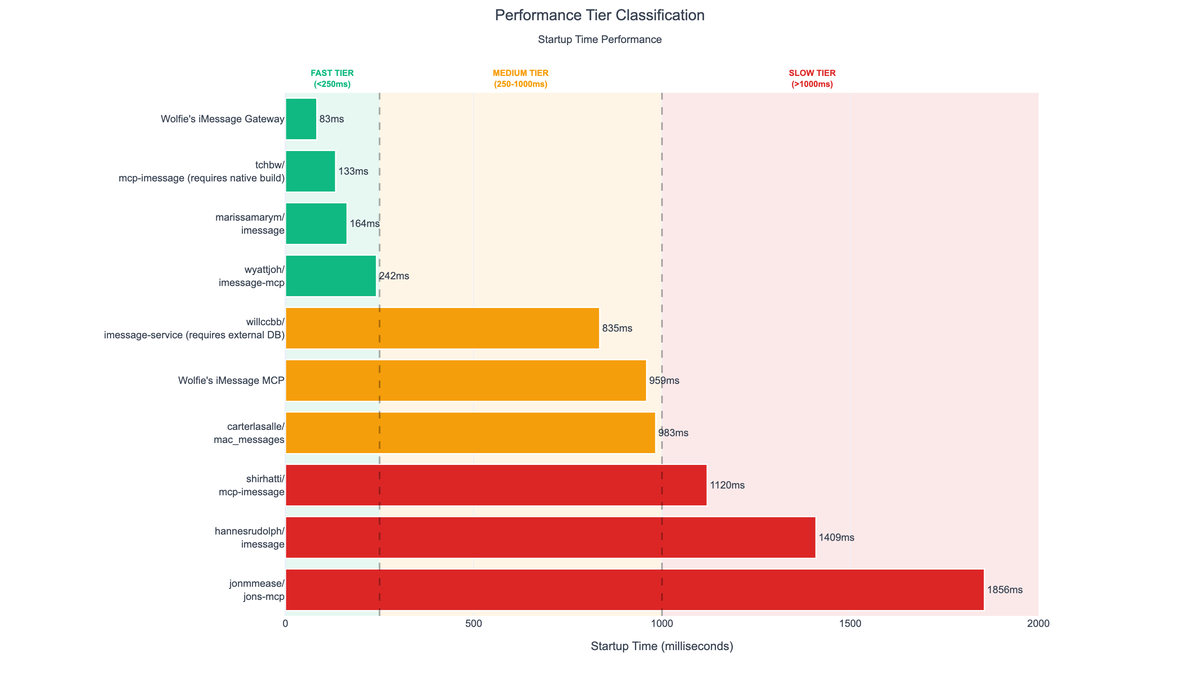
But for high-frequency operations, startup overhead matters. The system supports daemon-style gateway paths for repeated calls.
Here’s the “perception” framing I use when deciding:
System Shape
At a high level:
planner CLI
  ├─ core models + database
  ├─ agents (NL → actions)
  └─ integrations
        ├─ MCP servers (where it fits)
        └─ CLI/daemon gateways (where speed matters)
This hybrid approach is what makes the system feel usable day-to-day: correctness and structure, without sacrificing responsiveness.
Lessons Learned
- Schema is the safety rail: it’s what makes agent behavior predictable.
- Local-first reduces friction: it’s faster to adopt and easier to trust.
- Speed is a feature: the same integration can feel “good” or “bad” purely based on startup overhead.
You might also like
iMessage Gateway CLI
The fastest iMessage integration for Claude Code. CLI + daemon design avoids MCP overhead for "instant" UX.
SEC EDGAR Agent
AI-native platform for financial research providing LLM-ready SEC filing data with semantic search, RAG chat, and structured table extraction.
FGP (Fast Gateway Protocol)
Daemon-based architecture for AI agent tools. 19x faster than MCP stdio with sub-10ms latency via persistent UNIX socket daemons.
Interested in working together?
Get in touch →