Making Agent Tools Feel Instant: iMessage Gateway CLI
MCP is great for integration, but startup overhead kills UX. A CLI + daemon gateway keeps iMessage operations in the “instant” zone.
The Observation
Agent workflows fail in a boring way: latency.
If a tool takes long enough to feel “noticeable,” the workflow collapses into hesitation, retries, and context switching. For local tools, MCP startup overhead can dominate the actual operation time.
Here’s the mental model I used while building the gateway:
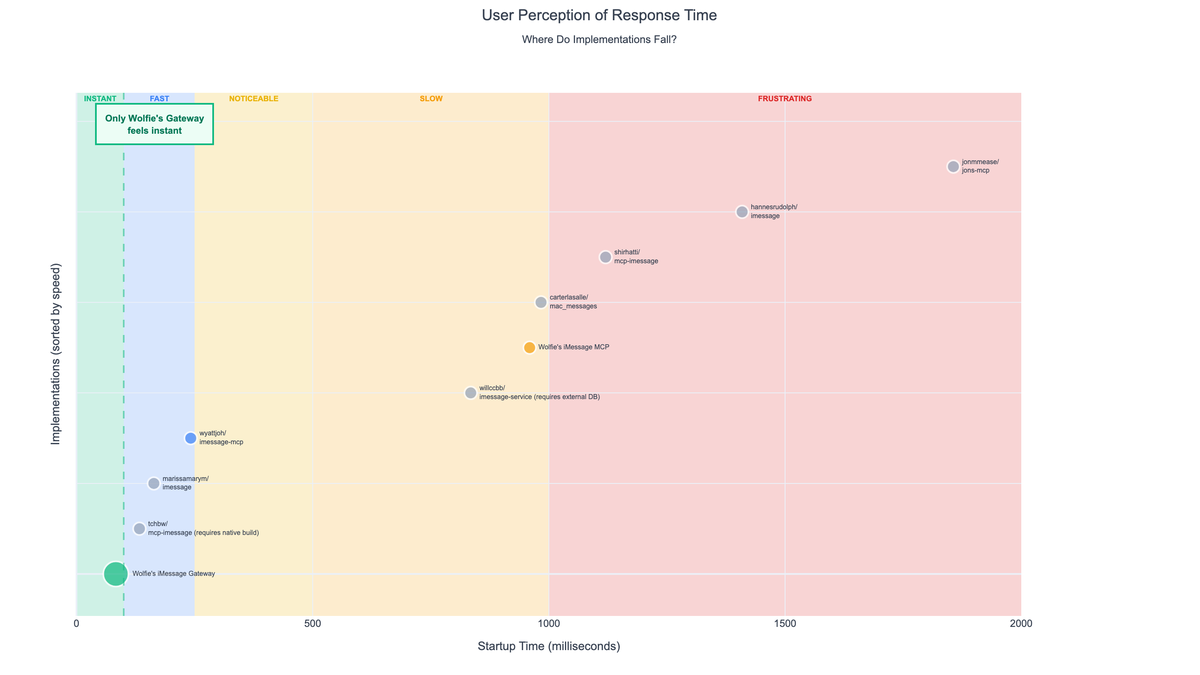
MCP vs CLI: Where the Time Goes
In many local integrations, the work is fast (querying a database, serializing results), but the protocol + process startup cost is slow.
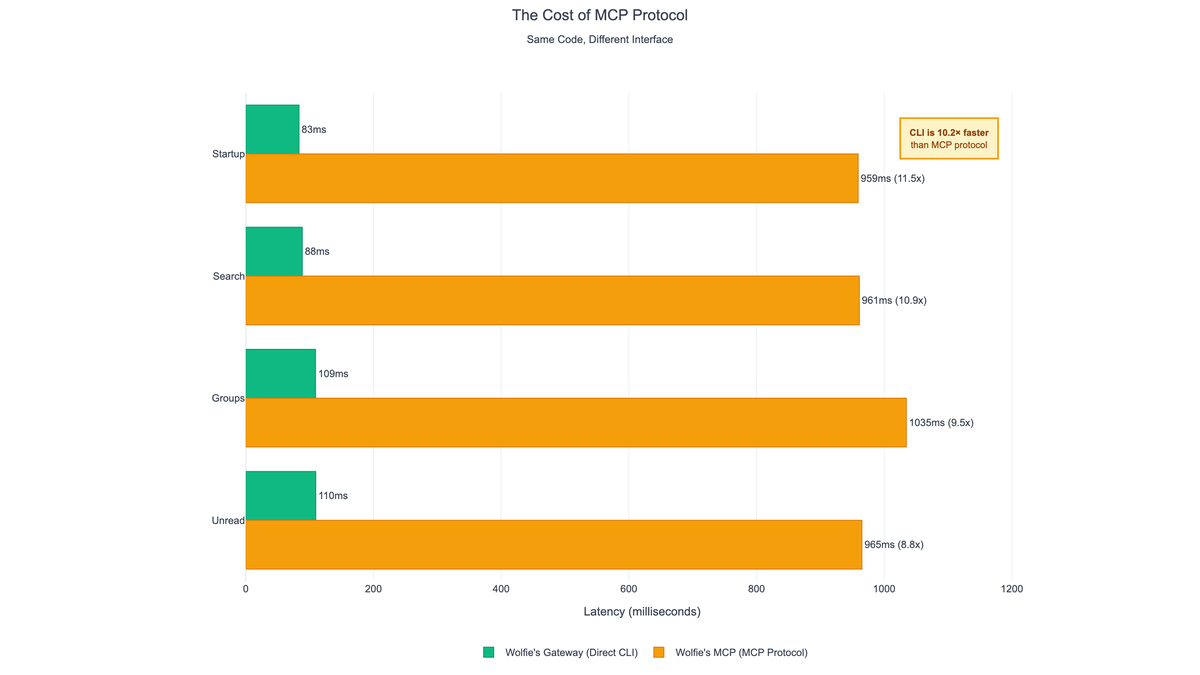
The goal of the iMessage Gateway CLI is simple:
Keep common operations in the “instant” range for high-frequency agent usage.
Architecture
The gateway is a macOS-first tool that talks directly to the local Messages database and surfaces a stable CLI interface agents can call repeatedly.
Agent / Script
  ├─ wolfies-imessage (CLI)
  └─ optional daemon (warm path)
        └─ Messages SQLite DB (local)
The crucial tradeoff is intentional:
- MCP: best for rich tool discovery + deep integration
- CLI/daemon: best for fast repetitive calls
Benchmarks (Why This Exists)
The gateway includes a benchmark suite to keep performance honest.
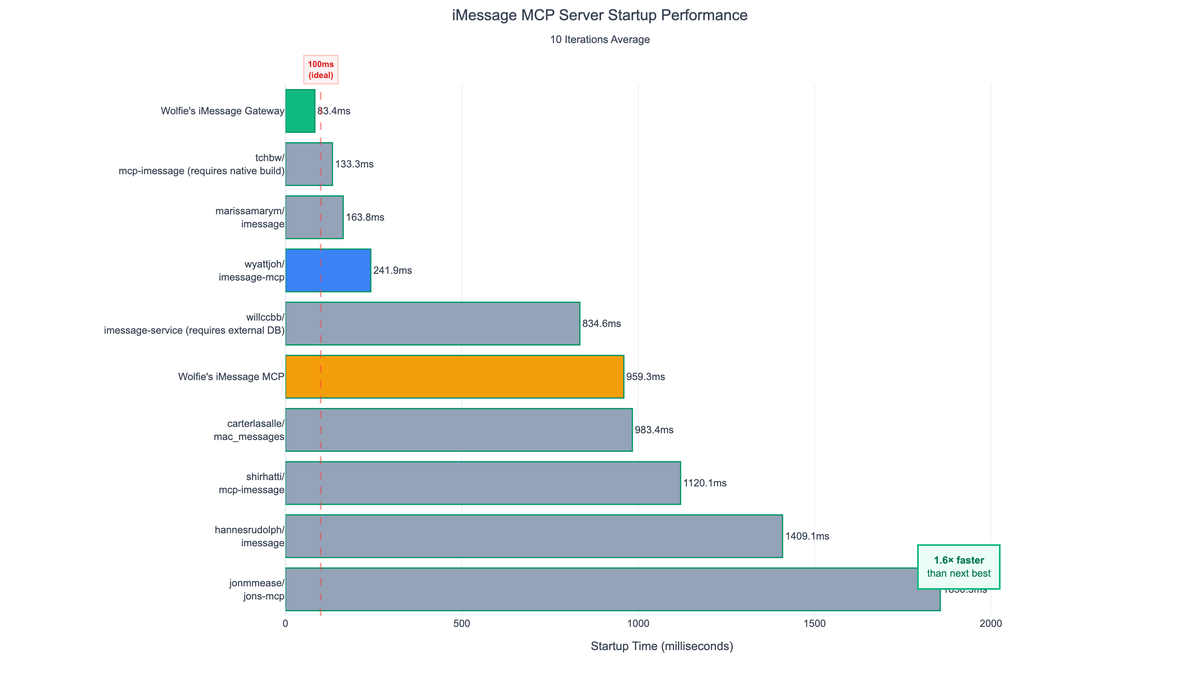
The results aren’t just “a bit faster.” They move the tool into a different user perception tier:
- Startup becomes small enough to be ignored
- Most ops are consistently sub-100ms
Benchmark Snapshot
The numbers below are a pragmatic comparison against MCP-style flows where startup overhead is paid repeatedly.
| Operation | Gateway CLI | MCP-based | Speedup |
|---|---|---|---|
| Startup overhead | ~44ms | ~763ms | ~17x |
| List contacts | 40ms | ~763ms | ~19x |
| Find messages | 43ms | ~763ms | ~18x |
| Unread messages | 44ms | ~763ms | ~17x |
| Group chats | 61ms | ~763ms | ~12x |
| Semantic search | 150ms | ~900ms | ~6x |
The takeaway isn’t “my code is faster.” It’s that eliminating startup overhead changes the user perception tier.
Making It Safe
Reading Messages requires macOS permissions and careful handling of personal data.
Key choices:
- Local-first: data stays on the machine
- Minimal outputs: return only what’s requested
- Benchmarkable behaviors: performance regressions are visible
Takeaways
- The user experience is dominated by startup costs more often than the “real” work.
- A “protocol-correct” approach can still be UX-wrong for high-frequency agent calls.
- If a tool’s median behavior is slow, agents become unreliable—even if the tool is correct.
You might also like
FGP (Fast Gateway Protocol)
Daemon-based architecture for AI agent tools. 19x faster than MCP stdio with sub-10ms latency via persistent UNIX socket daemons.
AI Life Planner
A personal operating system: projects, tasks, notes, and integrations—driven through an agent-first CLI.
SEC EDGAR Agent
AI-native platform for financial research providing LLM-ready SEC filing data with semantic search, RAG chat, and structured table extraction.
Interested in working together?
Get in touch →